
Getting Started with Robotics
Robotics looks like it needs a lab, a big budget and years of theory. It does not. The fastest way in is to build one small robot that actually works, then keep changing it.
This is what I would tell anyone starting today, and it is why I designed Sesame the way I did.
What makes a good first robot
- You can finish it. A weekend or two, not a semester. An unfinished robot teaches you less than a finished simple one.
- It is cheap enough to break. Under $100, so a burnt servo is a lesson, not a disaster.
- It teaches all three parts of robotics. Mechanical design and 3D printing, electronics and power, and code.
- It does something delightful when it works. Walking and making faces beats blinking an LED.
- It has room to grow. Firmware you can modify, an API you can script, and a community building on it.
Why I recommend Sesame
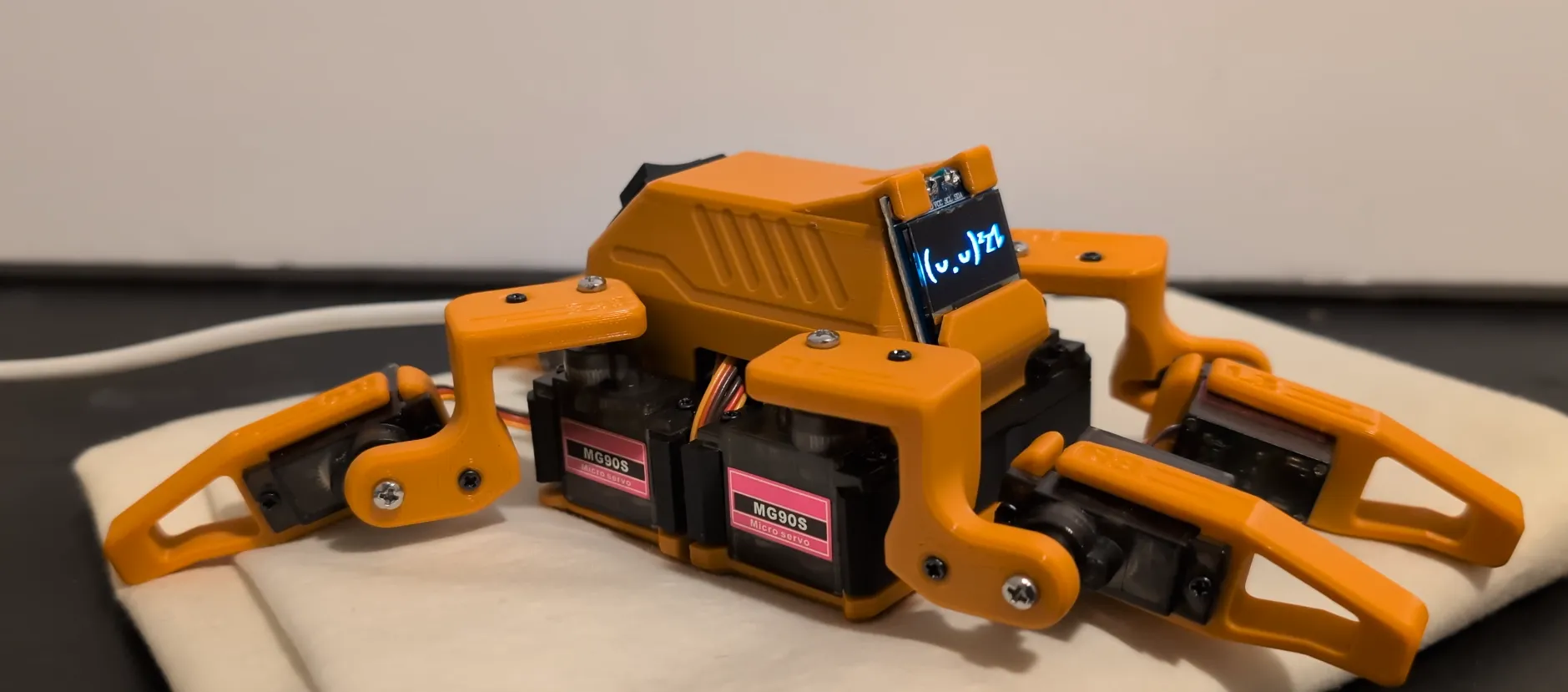
Sesame is an open source, 3D printed quadruped robot built around the ESP32. I designed it to be the robot I wish I could have built first.
| Cost | About $50 to $60 in parts |
| Controller | ESP32 (Lolin S2 Mini, or the Sesame Distro Board) |
| Motion | 8 MG90 servos, two per leg |
| Face | 128x64 OLED with animated expressions |
| Frame | PLA, prints with minimal supports in about an afternoon |
| Control | Built-in Wi-Fi control panel on your phone, a JSON API, and a serial command line |
| License | Apache 2.0: CAD, STLs, firmware and guides are all on GitHub |
Lots of people have built one, so when you get stuck, someone has usually hit the same problem. The Discord is active, and people have built a browser physics simulator and machine learning tooling for it.
What you need
- Parts: eight MG90 servos, an ESP32 S2 Mini (or a Distro Board), a 128x64 I2C OLED, and a 5 V 3 A power source. The bill of materials lists everything.
- Tools: a soldering iron, small screwdrivers, and a computer with the Arduino IDE and the ESP32 boards package.
- A 3D printer, or a friend, library, makerspace or printing service with one.
How to build it
- Print the frame in PLA. It is designed to print with minimal supports.
- Wire the electronics with the wiring guide, or use a pre-flashed Distro Board kit to skip most of it.
- Flash the firmware from the Arduino IDE.
- Calibrate the servos from the built-in web control panel.
- Make it yours: design animations in Sesame Studio, draw new faces, or write a Python script that drives it over Wi-Fi.
The full walkthrough is in the build video and the guides in the repository.
What you will learn
- 3D printing and designing parts that print well
- How servos work, and how to power eight of them without browning out your microcontroller
- ESP32 programming in the Arduino IDE
- Walking gaits, and why legged robots are harder than wheeled ones
- Controlling hardware over Wi-Fi with a web API
Where to go next
Once your first robot walks, the next project almost suggests itself:
- More legs: red.HEX, an 18-servo hexapod.
- Mechanisms and math: PenBot Mini, a five-bar linkage drawing robot.
- Vision and autonomy: the Autonomous Fridge Tank, which follows people with a camera, YOLO and ROS 2.
- Strange science: Fly Brain Bridge, where a simulated fruit fly brain drives a Sesame.
Other good starting points
If you have never touched electronics, an Arduino starter kit with LEDs, buttons and a servo is a fine warm-up for a week. A two-wheel line follower is another classic first robot. Both teach less about mechanics than a walking robot, but either one will make your first Sesame build go smoother.
Frequently asked questions
What is a good first robotics project?
A good first robot is cheap, finishable in a weekend or two, and teaches mechanics, electronics and code together. Sesame, an open source 3D printed walking robot built on an ESP32, fits that well: about $50 to $60 in parts, a full build video and guides, and it actually walks and has an animated face when you finish.
Do I need to know how to code to start robotics?
No. Many first robots, including Sesame, come with working firmware you flash from the Arduino IDE, so you can build first and learn to code by changing it: new animations in Sesame Studio, new faces, or Python scripts that drive it over Wi-Fi.
Should a beginner use Arduino, ESP32 or Raspberry Pi?
For a first robot, an ESP32 programmed with the Arduino IDE is a sweet spot: it costs a few dollars, controls servos directly, and has Wi-Fi built in so you can control the robot from a phone. A Raspberry Pi is better later, when you add cameras, computer vision or ROS 2.
How much does it cost to get into robotics?
You can start for well under $100. Sesame's parts cost about $50 to $60. Add a soldering iron if you do not have one, and either a 3D printer or a printing service for the frame.
Can teenagers or kids build Sesame?
Teenagers who are comfortable following build guides can build it, and younger builders can with an adult helping with soldering. A pre-flashed Sesame Distro Board kit removes most of the wiring.
What should I build after my first robot?
Extend it before you replace it: write new gaits and animations, script it over its JSON API, or try the Sesame simulator and machine learning tools. Then step up to bigger builds, like an 18-servo hexapod, a drawing robot with a five-bar linkage, or an autonomous robot with a camera and ROS 2.